After your treatment, you will automatically receive a tax invoice receipt created in the name of & on behalf of your service provider.
If you haven't received this email, please kindly check your Spam/ Junk folder.
You can also download the tax invoice directly from your Blys account. Please follow the steps below:
Log in to your account and go to Past Bookings.
Select the booking for which you need the receipt.
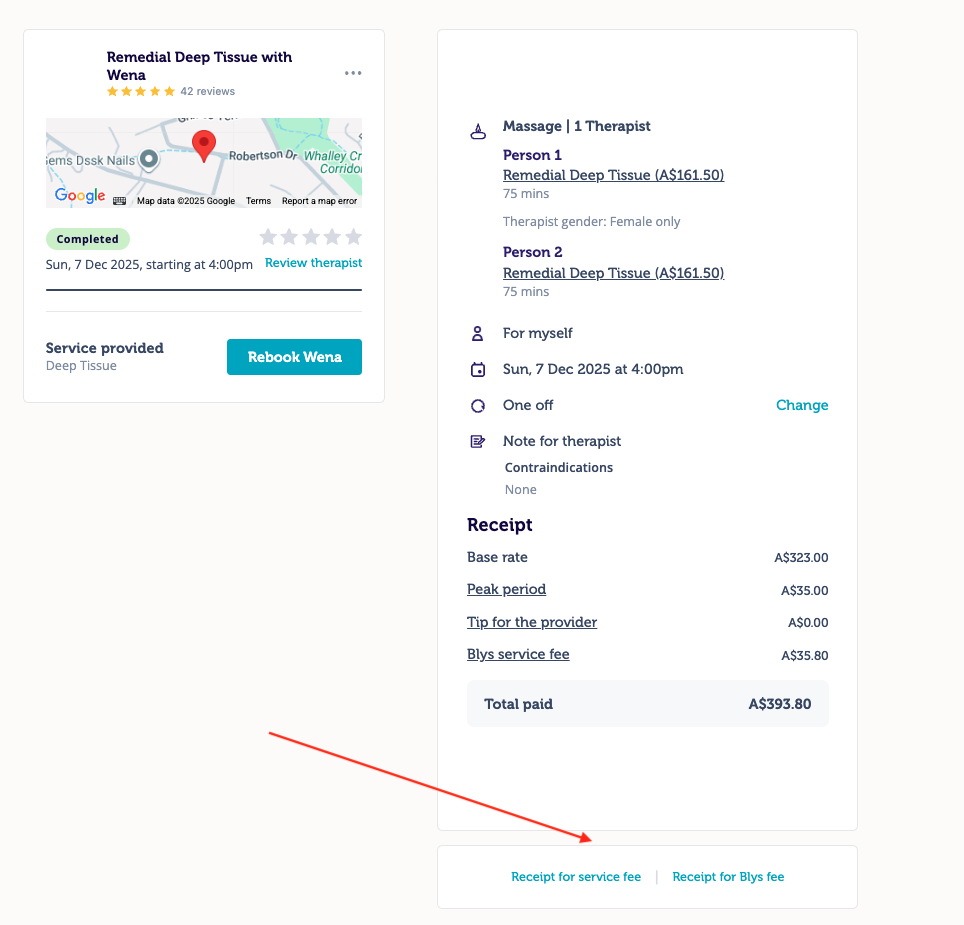
Once the booking opens, you’ll see a Download Receipt option on the bottom-right corner of the page.
Tap to download. (Screenshot attached below)
Tax invoice receipt includes:
- Provider Name
- Provider Health Fund ID/s (if any / registered)
- Provider Registered Business Address
- Provider ABN
- Client's Name
- Client's Address
- Date of the Booking
- Invoice Number
- Reference Number
- Description (of Service)
- Service Rate
- GST (if registered)