Blys for Teams – Corporate Wellness Made Simple
Blys for Teams provides businesses with convenient and high-quality wellness services, including massage, beauty, and self-care treatments, directly in the workplace. These services help boost employee well-being, productivity, and engagement. Whether you need a one-off office wellness day or a recurring program, Blys makes it seamless to organise and deliver.
In this article
- What is Blys for Teams?
- Services available for groups
- How does it work?
- How to manage the slots
- Additional features
- Setup and space requirements
- Pricing
- Organising recurring wellness programs
- FAQs
What is Blys for Teams?
Blys for Teams is Blys's portal for corporate teams to get corporate and group booking service. It's used by:
- Businesses running team wellness days or end-of-year events.
- HR personnel offering wellness as an employee benefit.
- Co-working spaces adding wellness to member perks.
Services available for groups
- Chair massage (seated, clothed): This is the most popular corporate format. No table or oil is needed for chair massage, and they can set up in most office spaces or conference rooms without any stringent restrictions.
- Table massage: Table massage is another option for teams looking to relax in their workspace. You’re required to clear a space of approx. 2m x 2m per table for this treatment. Multiple providers can work simultaneously.
- Beauty services: Massages aren’t the only options for team wellness. You can also plan out nail bars, facials, and hair & makeup bars for events and pamper days for your team.
- Yoga and Pilates: Group wellness sessions in office spaces or outdoor areas.
- Mixed modality events: For the ultimate wellness retreat, you can combine massage, beauty, and fitness for a full wellness day.
Services available vary by market. Contact us at events@getblys.com to confirm availability in your location.
How does it work?
Create a booking
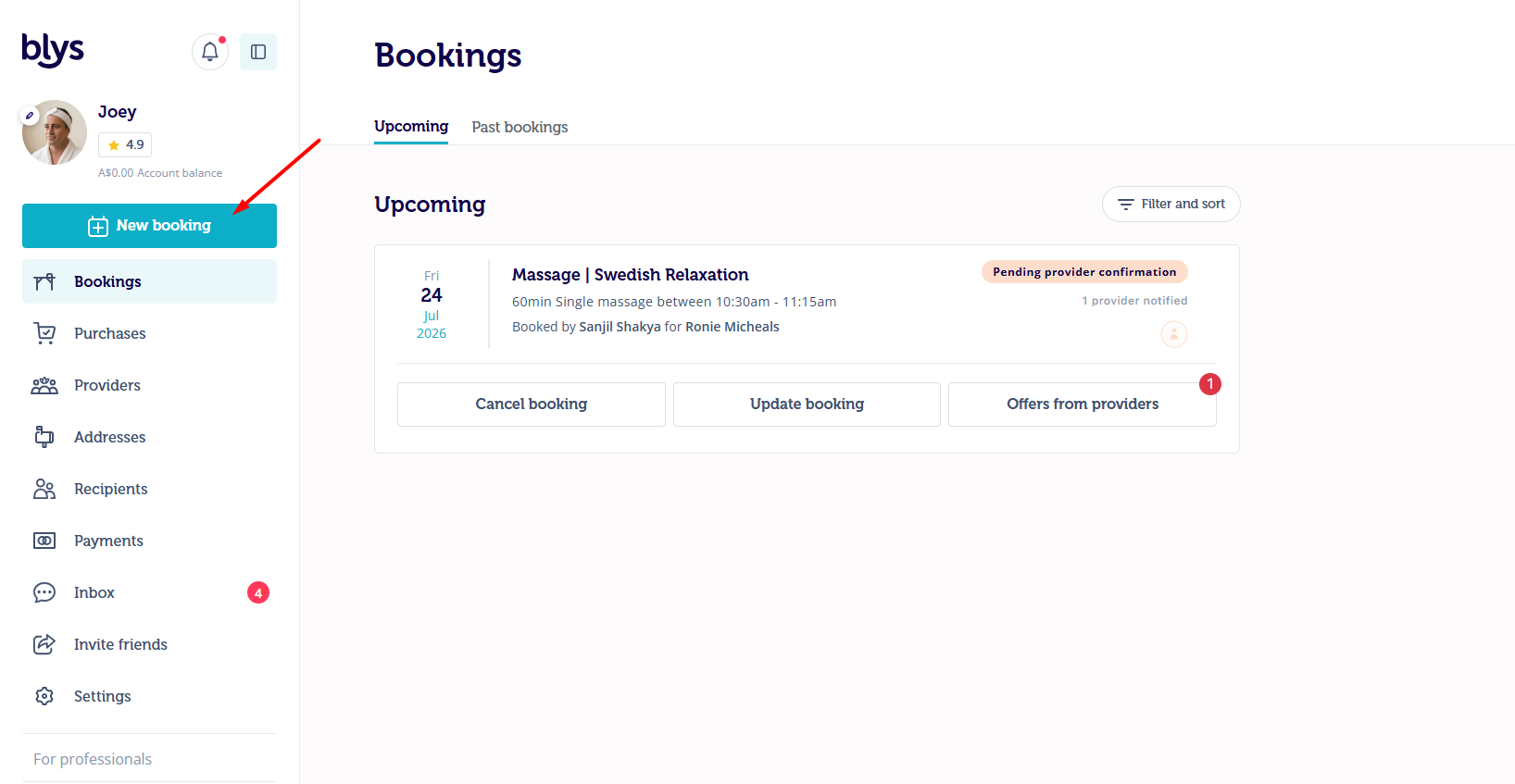
- Once you log in, click on "New booking" to place the booking.
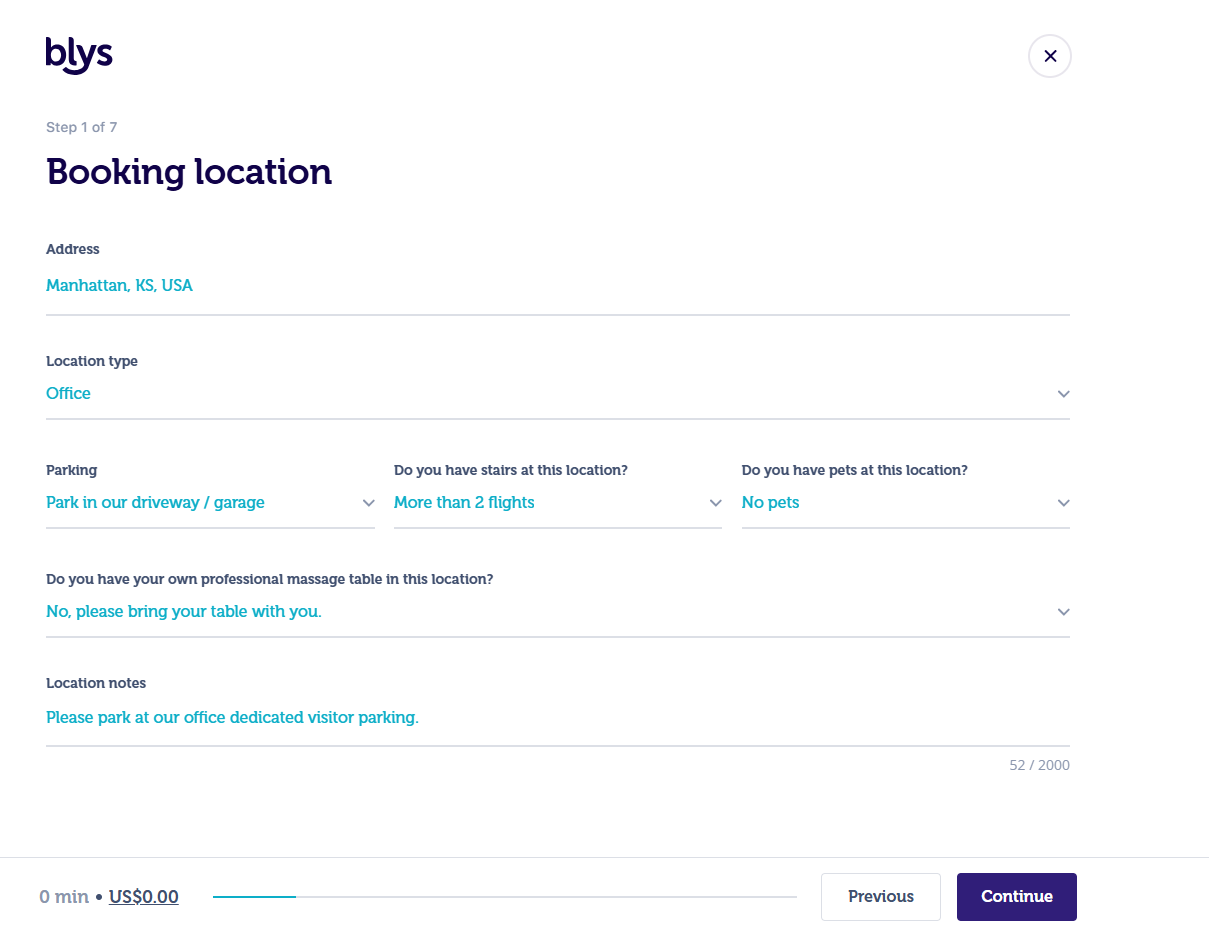
Step 1: Booking Location
- Enter all your booking location information and press "Continue".
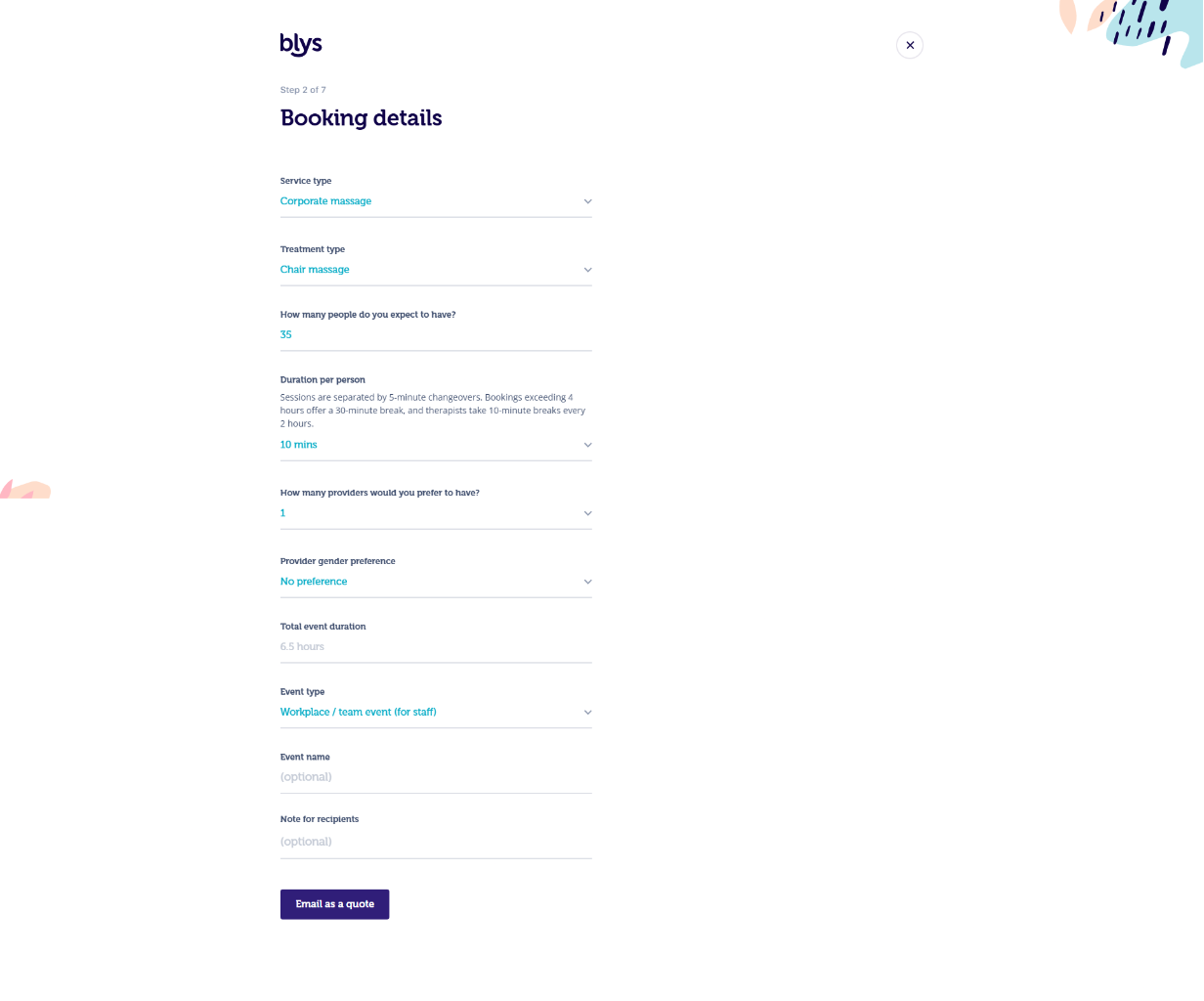
Step 2: Booking details
- Choose the Service, Treatment type, number of people and other required details and press "Continue"
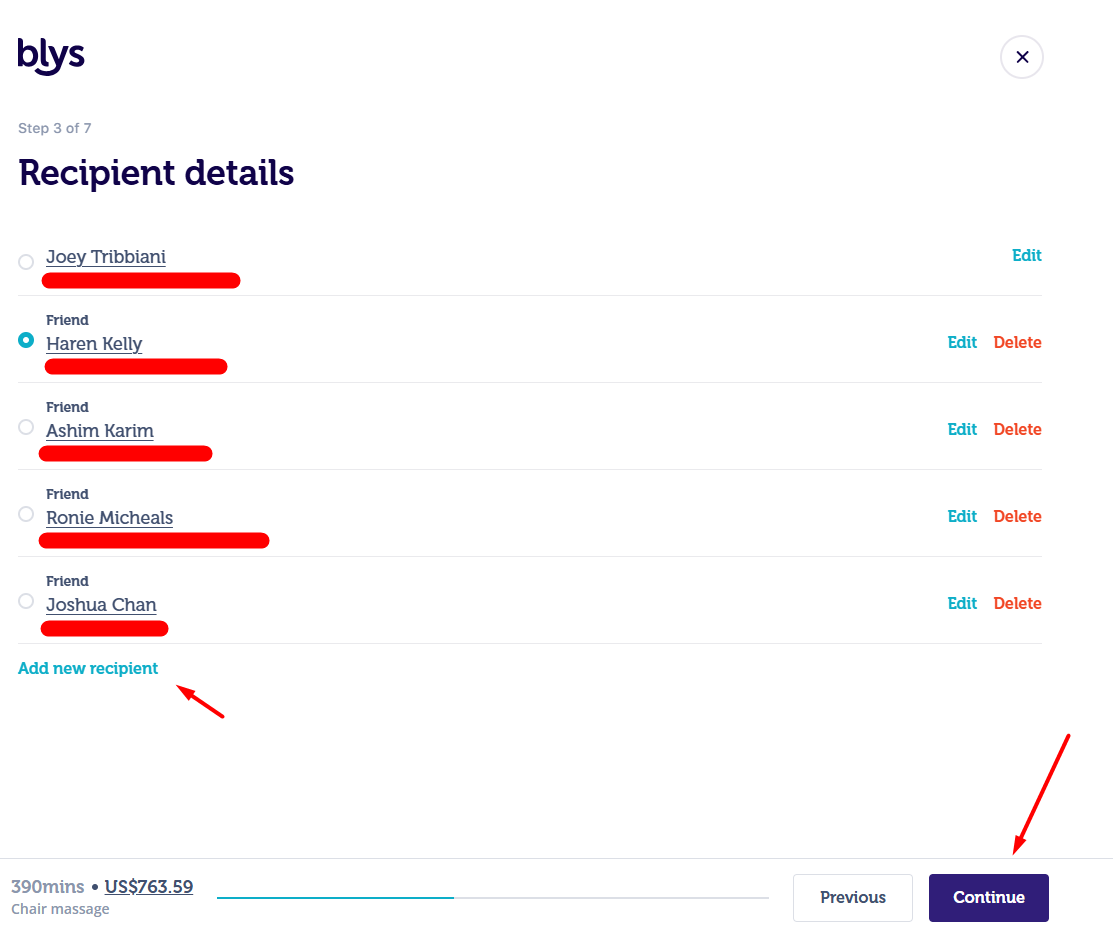
Step 3: Recipient details
- You can choose in the current receipient or add new receipint.
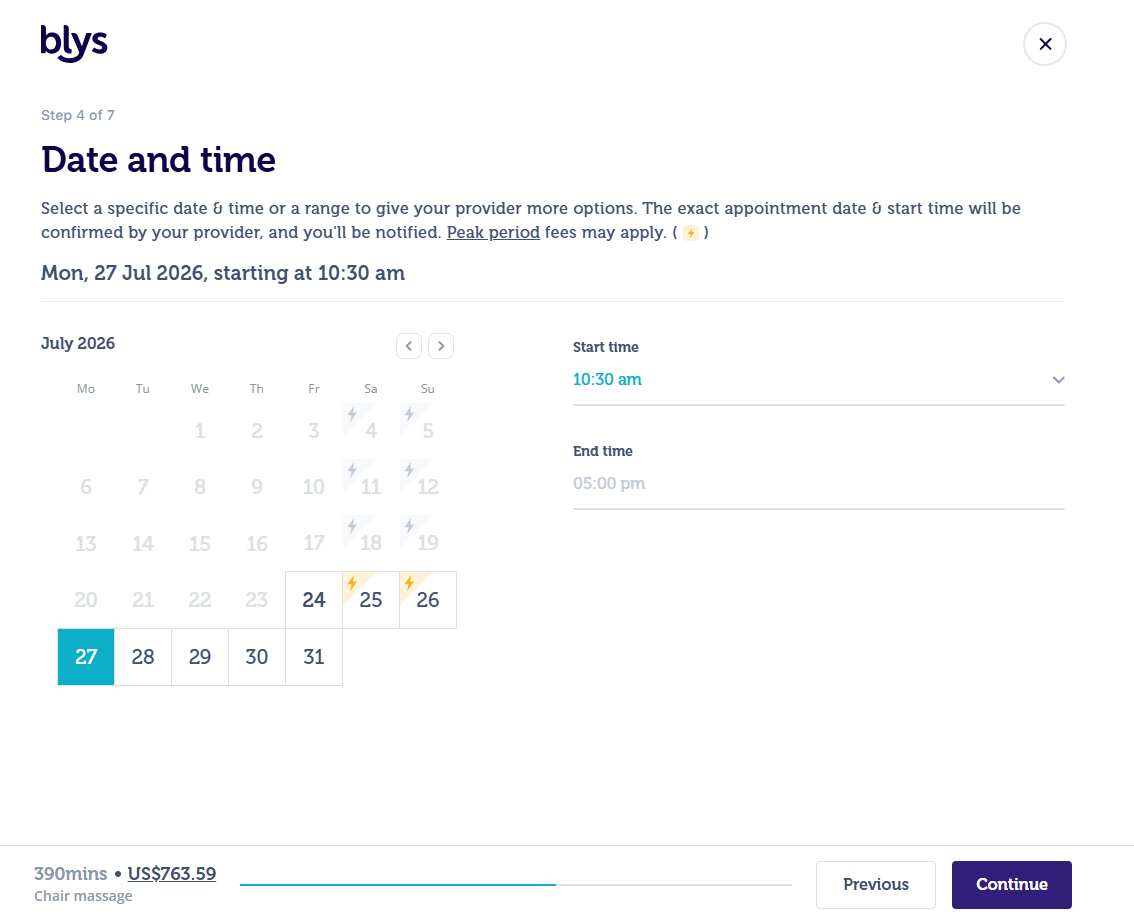
Step 4: Date and time
- Choose the date and time when you would like to place the booking.
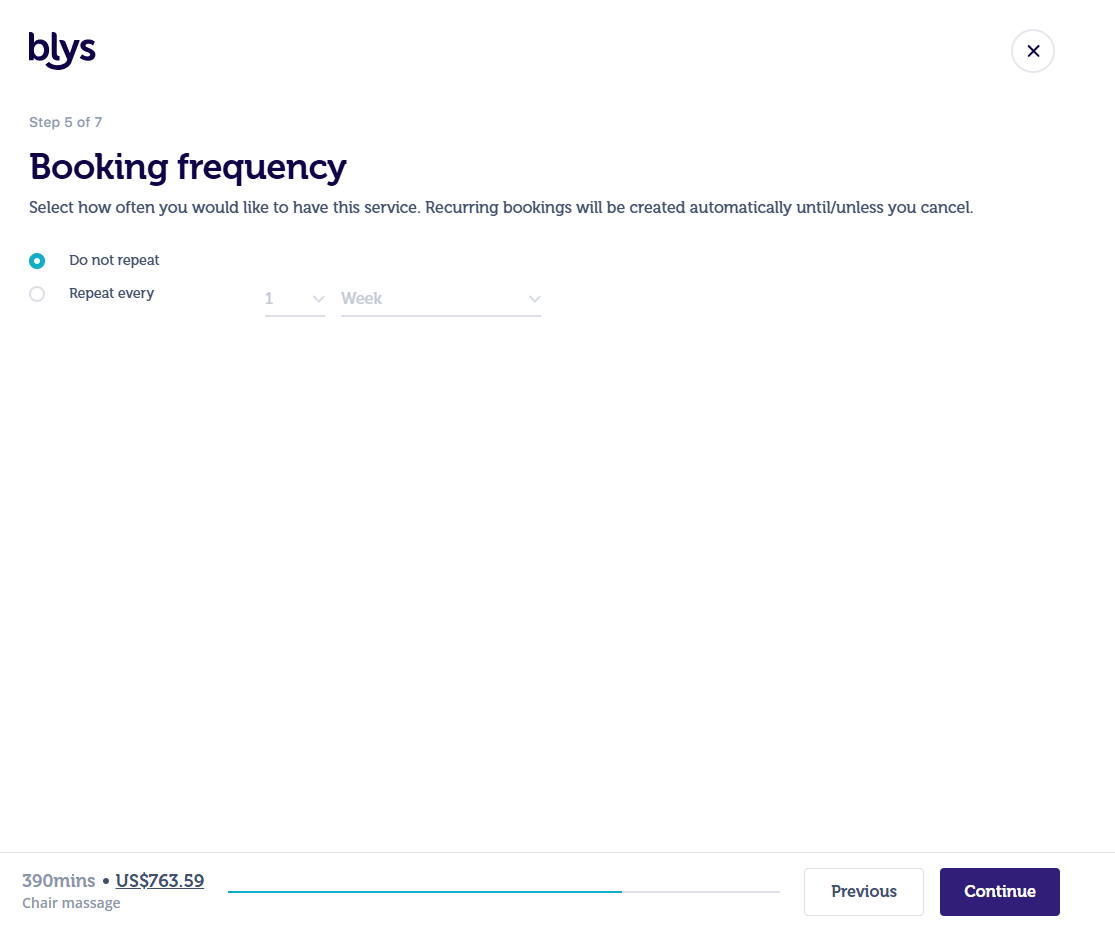
Step 5: Booking frequency
- You can choose the booking frequency in this step. Please choose "Do not repeat" if this is
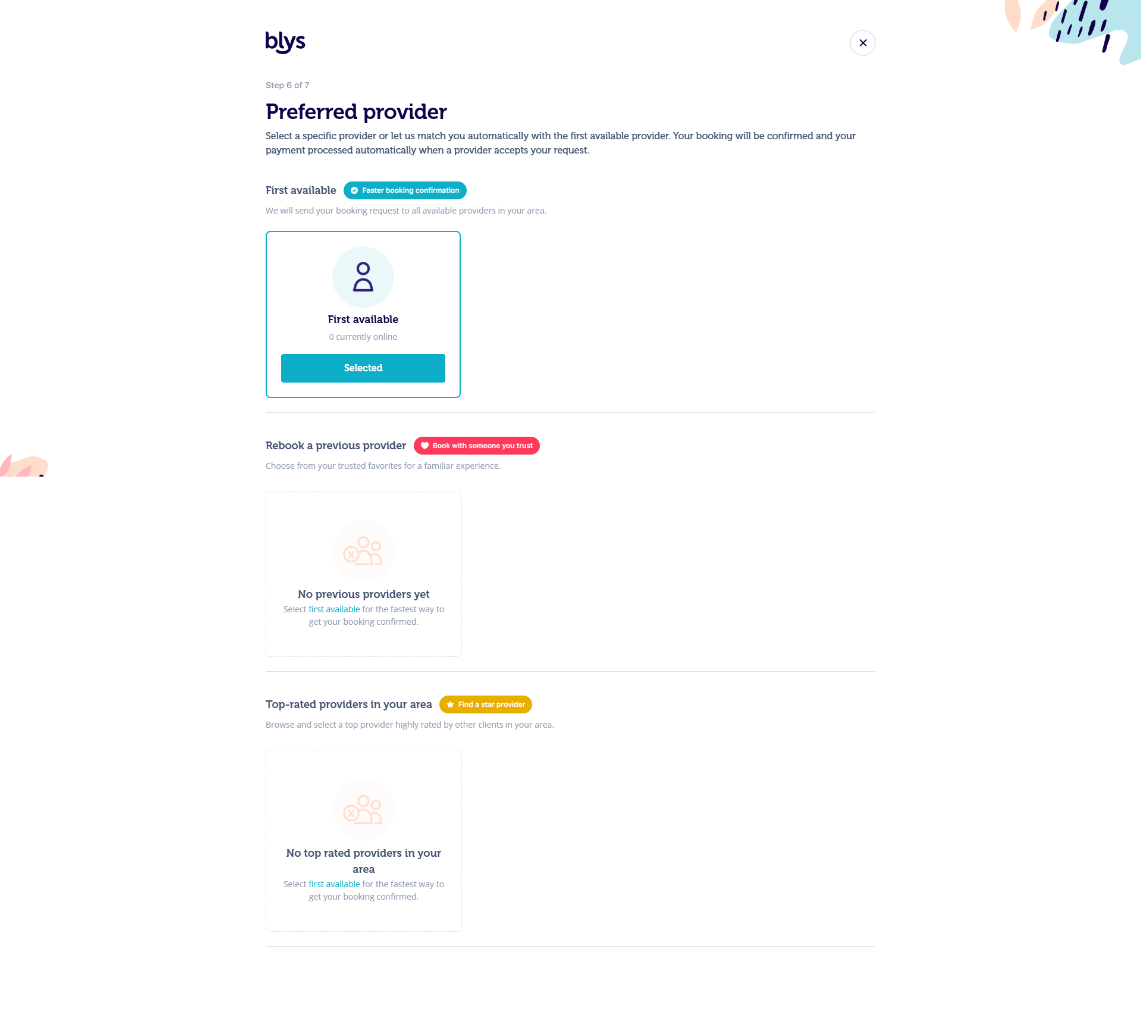
Step 6: Preferred provider
- You can choose the fastest option which is the first available provider or may choose from the list of Top-rated providers in your area.
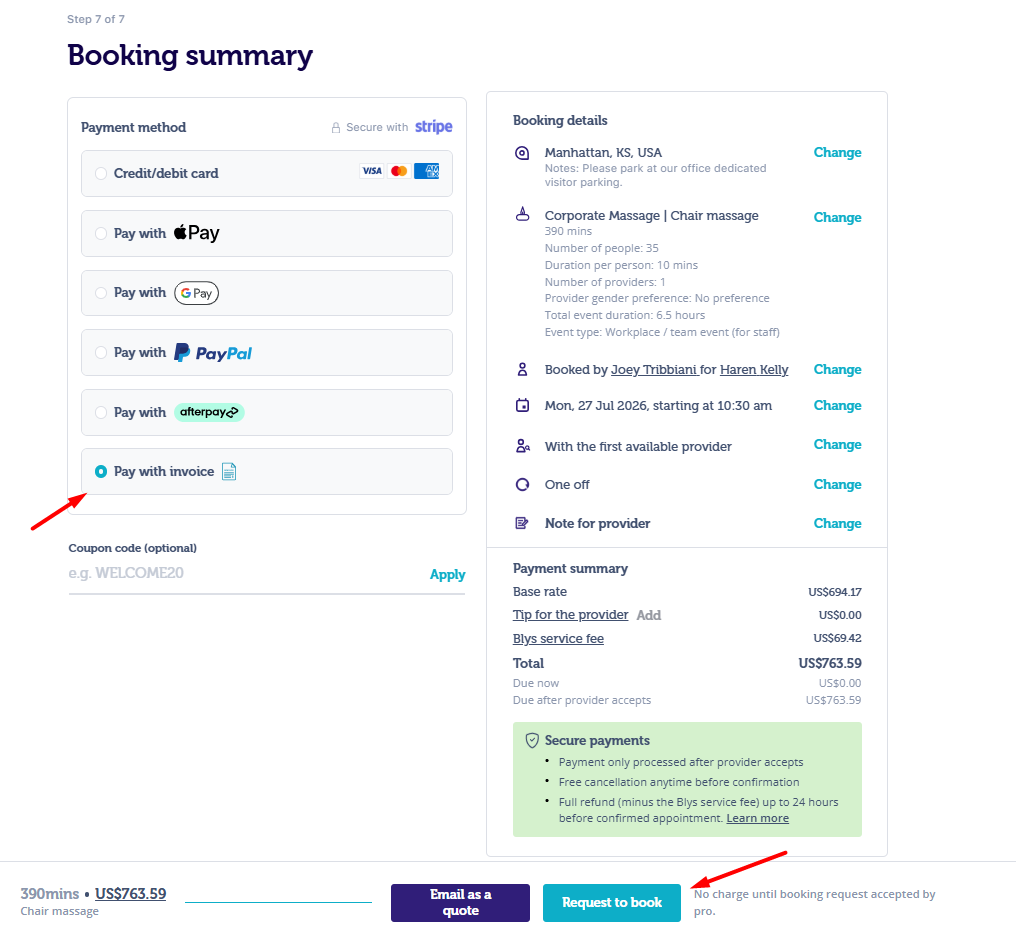
Step 7: Review and book
- You can review all the details entered so far and change any particular details by clicking on "Change"
- You may choose to pay using the payment method available or select "Pay with invoice" to place the booking.
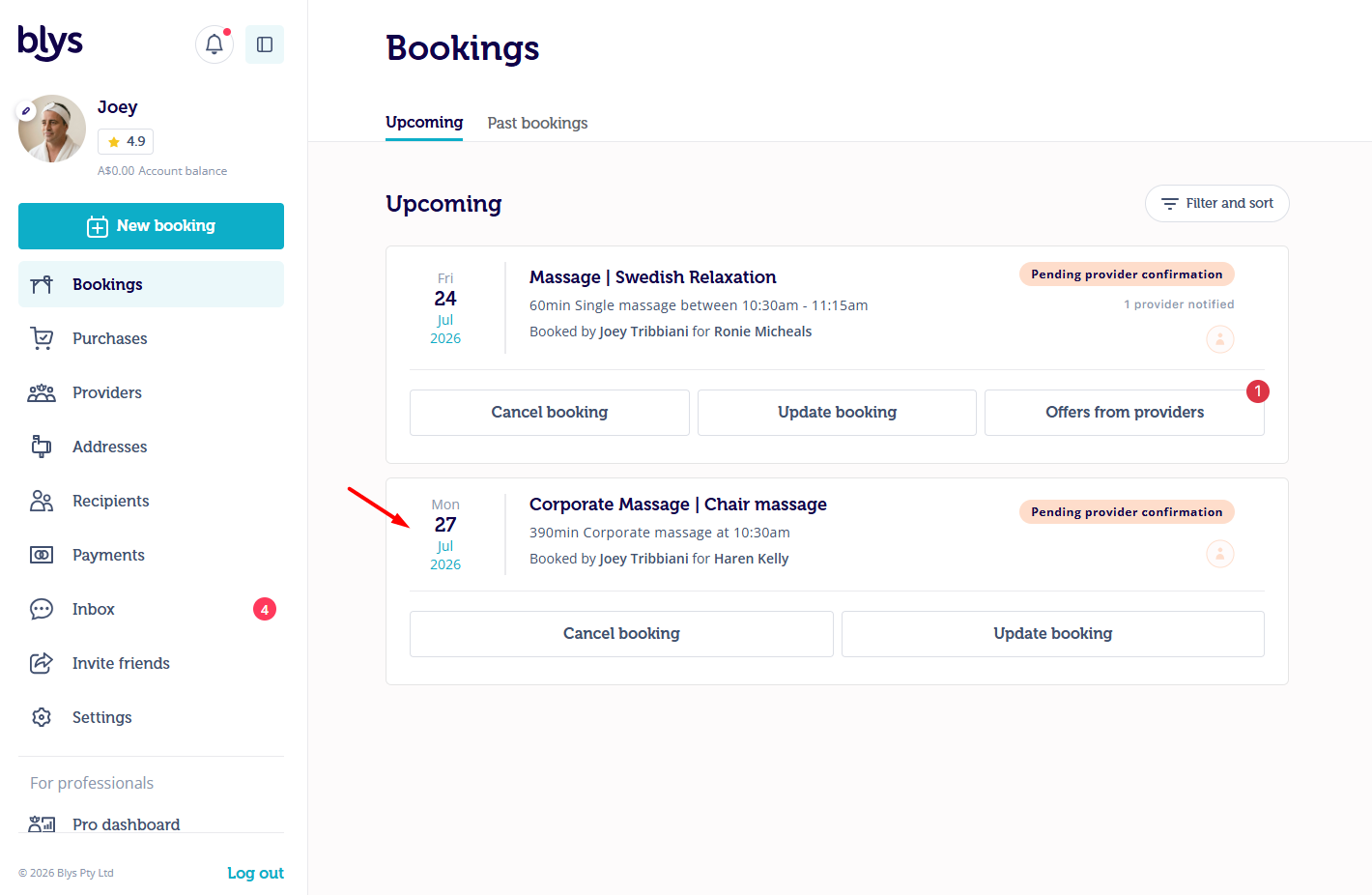
- After the booking is placed, we will notify the providers around the area, and the booking status will be "Pending provider confirmation" as per the screenshot below:
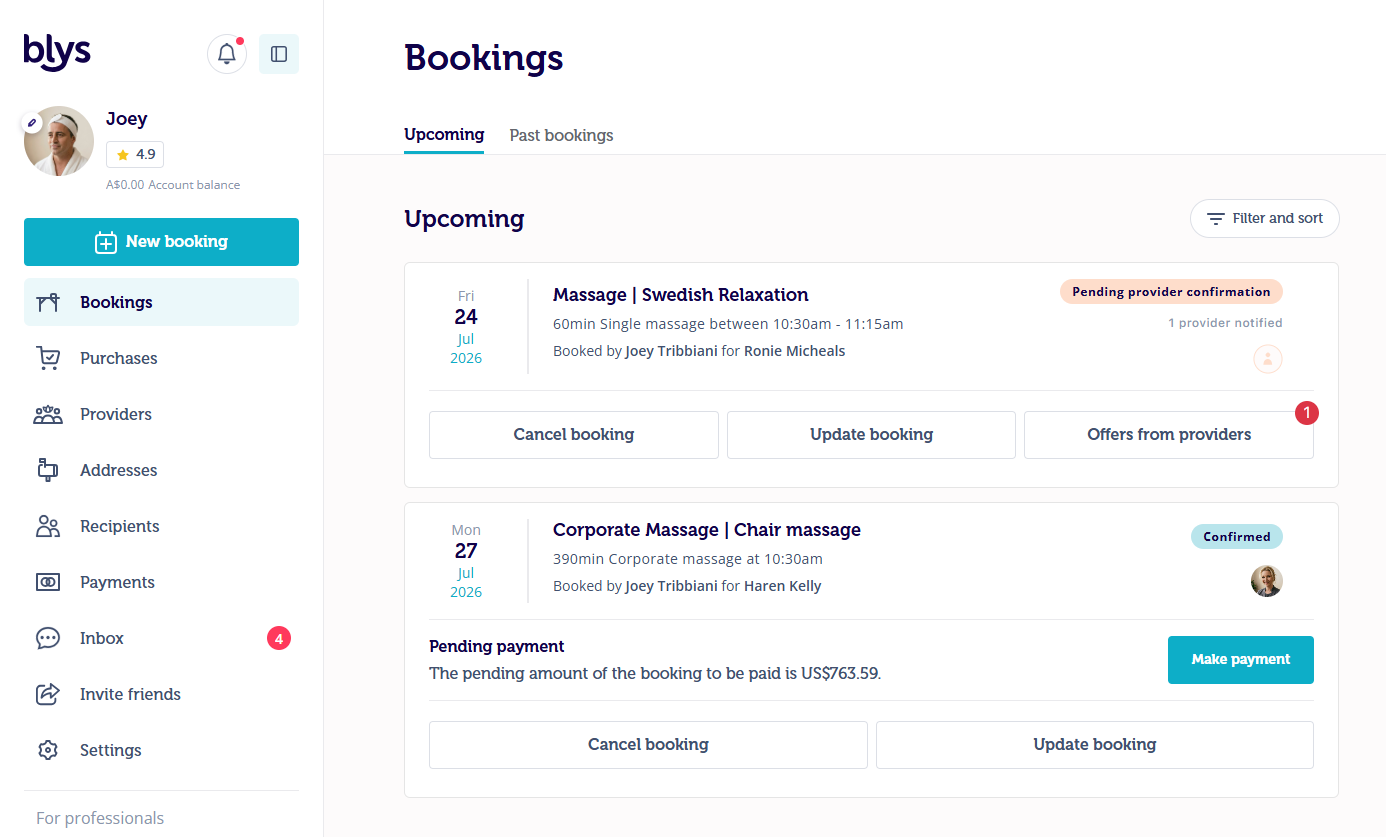
- After the provider accepts the booking, the status will be "Confirmed" and "Pending payment". The payment has to be settled to continue with the booking.
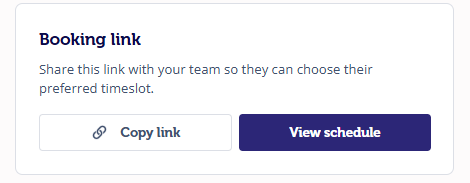
- Once you navigate inside the booking, you can see the Booking link at the bottom and see the schedule when the team members book their time slots.
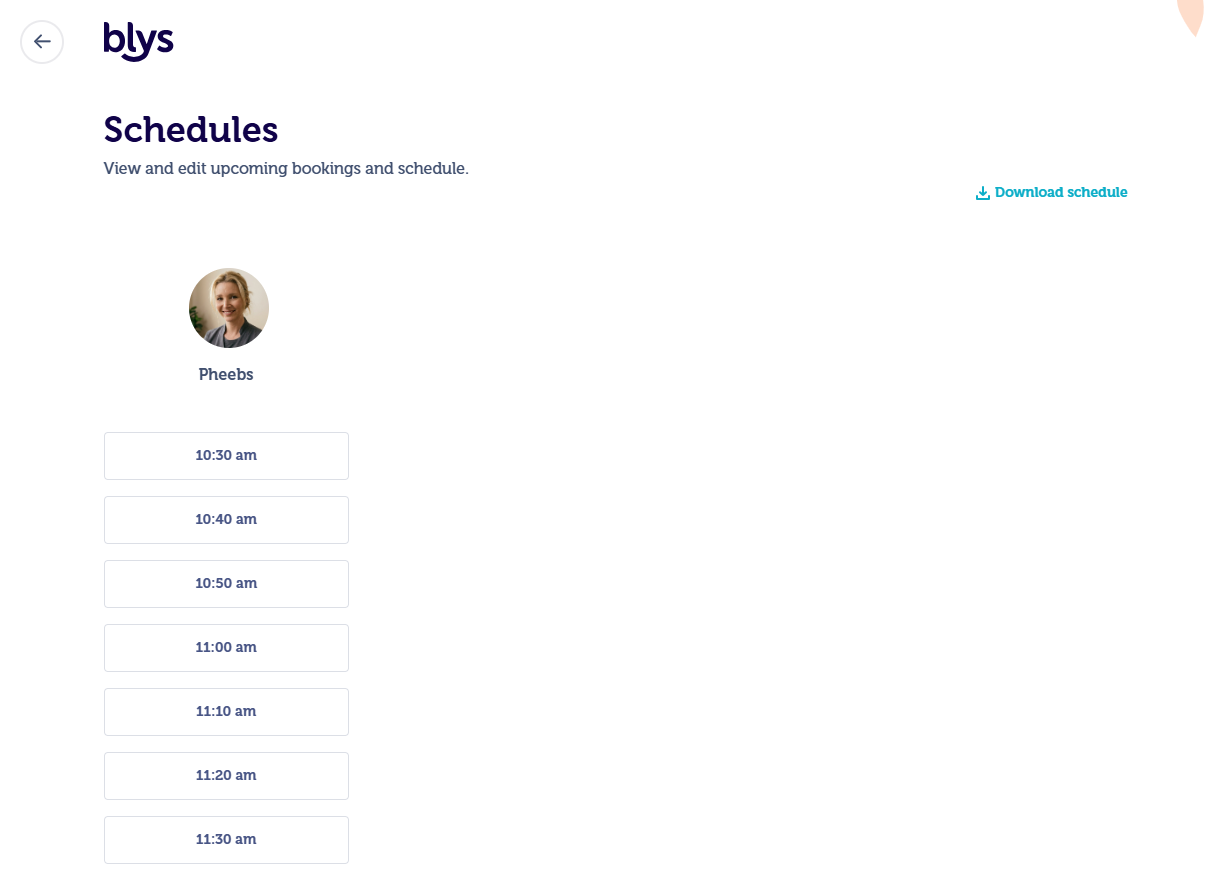
- Simply click on View Schedule to see the schedule
- Blys generates a calendar link that can be shared with staff to book their preferred slot.
How team members can book their time slots
- Once you share the link with your team members they can simply click and book the time slots.
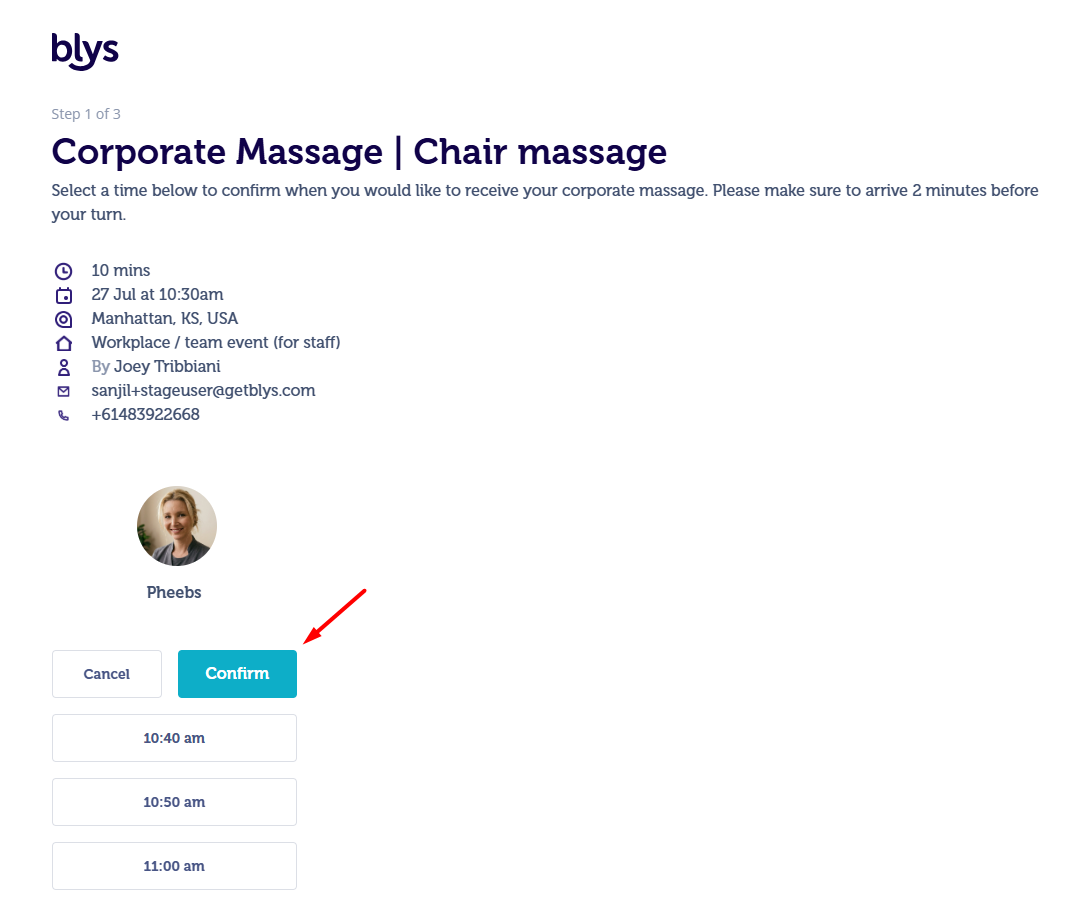
- They will see the page as per the screenshot below and choose the convenient time:
You can also watch this video on How team members can book time slots? for a visual explanation.
Step 1: Confirm the details and choose the time from the available time slot.
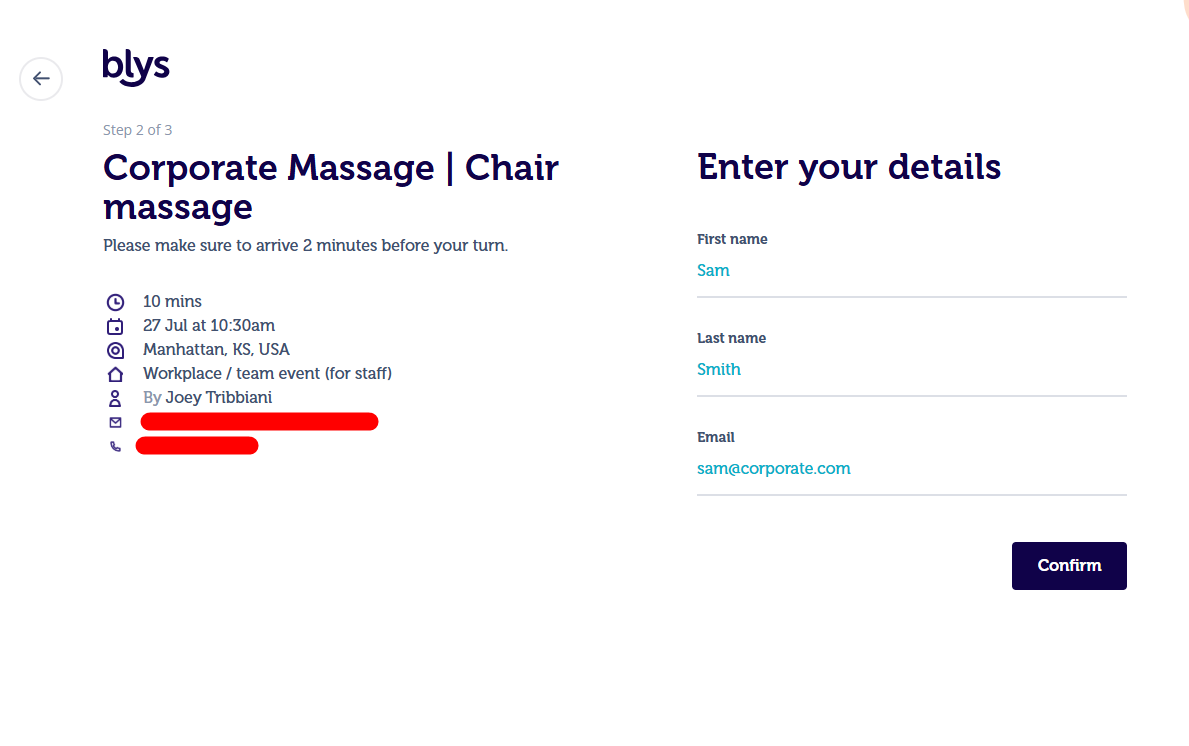
Step 2: Team members can book their time slots using their First name, Last name, and email.
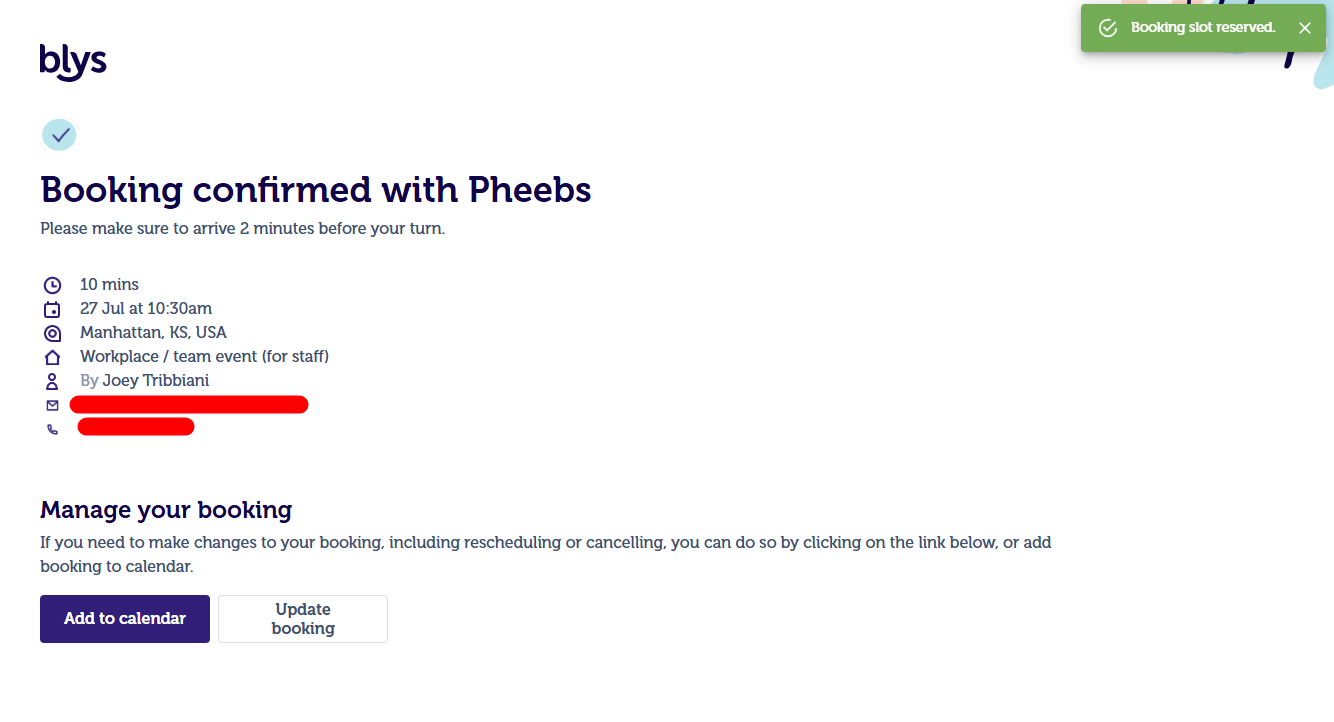
Step 3: Time slot confirmation. The team members can also add time slot details to the calendar and update their time slots.
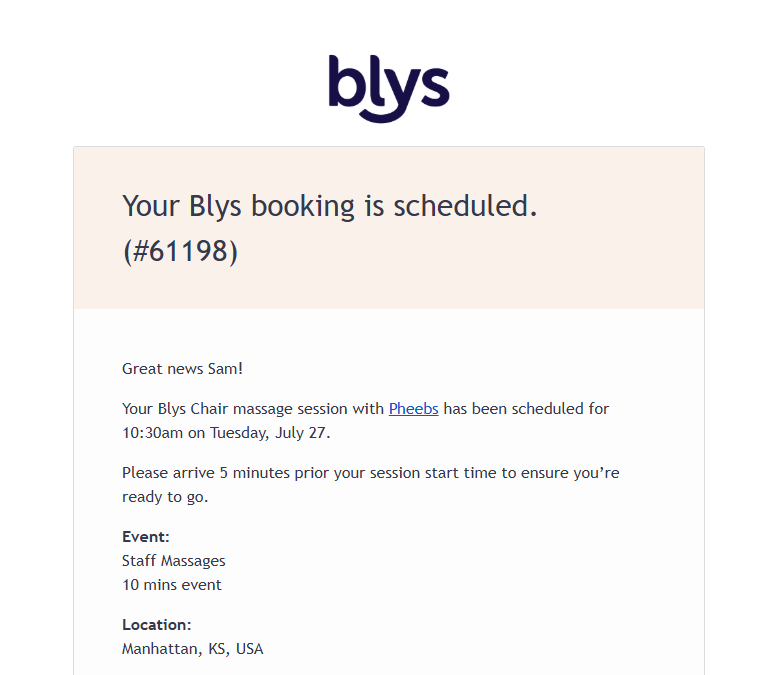
- The team member receives a confirmation email (meeting invite) that they can accept to add to their work calendar.
- They can also update or cancel their slots if needed
How to manage the slots
- Account Owners (e.g., HR Managers) & Account Members (e.g., HR Coordinators) can:
- View and manage the full list of booked slots.
- Remove staff members from time slots if necessary.
- Staff Members (Recipients) can:
- Only view and manage their own booked slot.
Additional features
- Waiting List – If all slots are booked, employees can join a waitlist and will be notified on a first-come, first-served basis.
- Breaks for Long Sessions – If a provider’s session lasts more than 4 hours, a 30-minute paid break is included automatically.
- Schedule Export – Companies can download a PDF schedule of all booked slots for easy reference in the office.
- Provider View – Service providers can view the full list of booked employees in the Blys Pro App.
Setup and space requirements
- Chair massage: flexible - corner of a room, hallway, or dedicated wellness space. Approx. 1m x 1.5m per provider.
- Table massage: approx. 2m x 2m clear space per table, plus space for the provider to move.
- Allow 15 minutes setup and 15 minutes pack-down per provider at each end.
- Providers bring all equipment, so there’s no need to provide anything.
Pricing
- ⏱️ Charged per provider, per hour
- 📅 2-hour minimum per provider
- 💳 10% Blys service fee added to confirmed bookings
- 🕘 Rates below apply on weekdays during standard business hours
🌍 Market | 💺 Chair massage | 🛏️ Table massage |
🇦🇺 Australia | A$119 | A$129 |
🇳🇿 New Zealand | NZ$119 | NZ$129 |
🇺🇸 United States | US$119 | US$129 |
🇨🇦 Canada | C$119 | C$129 |
🇬🇧 United Kingdom | £74 | £78 |
💡 Example: one chair massage provider for 2 hours in Australia is A$238 plus the 10% Blys service fee.
✉️ Event pricing for Europe and other markets, beauty, yoga and Pilates, and mixed-modality events is available on request. Final pricing depends on the services, duration, number of providers, date and time, and any applicable surcharges.
Surcharges per provider
Applicable surcharges may depend on the booking time, day and venue:
- Early morning bookings (6am to 9am)
- Evening bookings (6pm to 9pm)
- Late night bookings (9pm to midnight)
- Weekends
- Public holidays
- Hotel or conference venues
- No free or metered parking available
Any applicable surcharges will be confirmed in your quote.
To request a quote, email events@getblys.com with your date, location, estimated attendance, event duration, preferred services and session lengths, and whether the booking is recurring.
Cancellation terms
Group bookings of 4+ people may have different cancellation terms:
- 72+ hours before: 10% platform fee only
- 48–72 hours before: 20% of booking value
- 24–48 hours before: 50% of booking value
- Under 24 hours: 100% of booking value
For details, check out this article.
Invoice and billing
- Tax invoice generated per booking, downloadable from your account.
- Monthly consolidated invoicing available for corporate accounts.
- GST-compliant invoices available for AU businesses.
- PO processing available on request.
Organising recurring wellness programs
Blys can support ongoing monthly or weekly wellness programs. Some of the popular formats are:
- Monthly wellness days with rotating chair massage for the whole team.
- Fortnightly yoga or Pilates in the office.
- Quarterly pamper events for high-performing staff.
Contact events@getblys.com for more information on how to set up a recurring program.
FAQs
Can I book for an event with 50+ people?
Yes. We can help you coordinate multiple providers simultaneously. It’s best to give the team as much lead time as possible for large events.
Are group bookings eligible for health fund claims?
No. Group and corporate bookings are not eligible for health fund claims.
Can providers come to our hotel or conference centre?
Yes, providers can come to your hotel or conference center. You simply need to add the details in your location notes. However, please be mindful about hotel/venue surcharges that apply per provider.
Can I book different services for different people?
Yes. You can customise services per attendee. For this, you can contact our team through events@getblys.com to discuss in detail.
Can we request the same providers each time?
Yes, you can! We'll note your preferred providers for recurring programs.
What happens if a provider is no longer available for a confirmed slot?
If a provider becomes unavailable after being confirmed, your booked time slots stay the same. The scheduling link you shared with your team remains valid, so employees can still view and book their preferred slots while we confirm a new provider for that time. There is no need to ask staff to rebook or resend the link.